Tutorial -How to manually Block advertisement in Opera Web browser
Works a treat and doesn't slow up your browsing. Opera has built in popup blocker and an adblocking feature as well.Using the adblocking feature is as simple as downloading a text file and putting in the right folder.Opera's ad blocking works by referring to a file called url-filter.ini.There are many users who keep regularly maintained list of ad hosts and domains.
First method for Blocking ad in Opera Web Browser..
One of the most famous one and most used ones is Fanboy's Adblock list(www.fanboy.co.nz/adblock/) Click on the install now link or visit www.fanboy.co.nz/adblock/opera/urlfilter.ini.Save the file as it is
to a folder and then move it to C:\document and settings\Your_User_ID\Application Data\Opera_folder\profile.Linux users must copy to the .opera folder.When done,resart the browser and ad blocking will be enabled.Visit the site from time to time to update your adblock
list.
Second method for Blocking ad in Opera Web Browser.
1. Locate your Opera CSS directory; Go to Opera menu, Help, About.
IE: User CSS directory, /home/orakk/.opera/styles/user/

2. Close Opera. In the css directory create a blank file called
"adblock.css" or anything else you'd like to name it .
3. Now go to Ad Blocking FiltersetP at userstyles.org, click
the button "Show Code" and copy everything into "adblock.css"
Save and close the file.
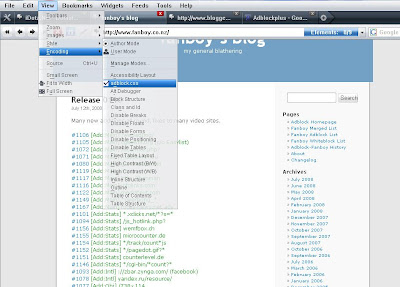
4. Open Opera and then select "View-->Styles-->adblock.css"
More Tutorial- How to create password Reset Disk in Window Xp.
2.Create Your Own Mobile Wap Site.
3.How to Make Multi Boot CD.


